
![ApptioCareers-Employee[1]](data:image/svg+xml;base64,PHN2ZyB4bWxucz0iaHR0cDovL3d3dy53My5vcmcvMjAwMC9zdmciIHZpZXdCb3g9IjAgMCAyMjUgMjc1IiB3aWR0aD0iMjI1IiBoZWlnaHQ9IjI3NSIgZGF0YS11PSJodHRwcyUzQSUyRiUyRnd3dy5hcHB0aW8uY29tJTJGd3AtY29udGVudCUyRnVwbG9hZHMlMkZlbGVtZW50b3IlMkZ0aHVtYnMlMkZBcHB0aW9DYXJlZXJzLUVtcGxveWVlMS1xZzVuenB5MHdoaWJtbzZvdmJqNGM3MHh0aTUzdmo1OHM0endwajh0dHMucG5nIiBkYXRhLXc9IjIyNSIgZGF0YS1oPSIyNzUiIGRhdGEtYmlwPSIiPjwvc3ZnPg== "ApptioCareers-Employee[1]")
Kubernetes Costs: From Nobody’s Problem to Everybody’s Problem
Kubernetes makes a lot of things easier. Teams can deploy faster, scale automatically, and share infrastructure without thinking too hard about what’s running underneath. But all that abstraction comes at a cost.
When compute, storage, and network resources are pooled across services and teams, the lines between who used what start to blur. You might know your app is running smoothly, but you probably don’t know how much it’s costing you/your company. Or who’s technically responsible for that spend. Then when a surprise cloud bill shows up, it’s usually nobody’s fault, which quickly turns into nobody’s job to fix. But that money has to come from somewhere, forcing everyone to re-evaluate their budgets and potentially make difficult choices. Worse still, with nobody owning the original issue, the surprise bills become a regular occurrence.
That’s the problem.
Cost visibility in Kubernetes is notoriously tricky. And without clear ownership, it’s almost impossible to act on it.
Why Cost Ownership Is So Hard in Kubernetes
Shared Infrastructure Obscures Responsibility
Kubernetes is designed for flexibility, pooling compute, storage, and network resources across many services and teams. But when multiple workloads share the same nodes and clusters, the boundary between owners becomes murky. Without clear segmentation, it’s difficult to determine who is responsible for what, and even harder to drive accountability.
Labeling Is Manual and Often Inconsistent
Kubernetes relies on user-defined labels to organize workloads and enable cost allocation. But without strict standards and enforcement, teams apply labels inconsistently or not at all. The result is fragmented metadata that breaks reporting logic, introduces gaps in usage tracking, and skews downstream cost data.
Dynamic Workloads Break Traditional Tracking
Pods are constantly spinning up, shutting down, and shifting across nodes. Even persistent workloads are rescheduled frequently due to scaling events, deployments, or health checks. These ephemeral patterns make it hard to trace resource usage over time without real-time, granular telemetry.
What Cost Ownership Should Look Like in Kubernetes
Clear Lines of Responsibility
Assigning cost ownership starts with defining who’s responsible for what. That means deciding how workloads are grouped and tracked—by namespace, label, or controller.
It helps to be explicit. For example, a namespace might represent a team or a service. Labels like team=kubecost or owner=platform give you a way to track cost back to an individual or group. Once that connection is in place, cost data becomes accountable.
Cost Accountability Without Finger-Pointing
The point of assigning ownership isn’t to blame anyone. It’s to give teams even deeper insights into the impact of the decisions they’re already making. Without that context, engineers are unable to balance performance and cost.
Cost accountability works best when it’s built into workflows. Teams should be able to see what they’re spending, identify what’s driving that spend, and adjust as needed. That feedback loop doesn’t need to be formal. Sometimes it’s just a dashboard or an alert that shows up during a sprint retro.
Alignment With FinOps Principles
This kind of visibility and accountability lines up well with FinOps practices. Showback is the idea of giving teams a view into the cost of their infrastructure, without charging them directly. Chargeback goes a step further and actually allocates budget or spend to the team itself. Either approach can work, depending on your culture.
What matters more is the collaboration between FinOps and DevOps. Finance can help guide strategy, but Engineering teams need to be empowered to take action. That collaboration is essential for the most efficient use of resources, so Engineering has the resources they need while managing spend as effectively as possible.
Strategies for Defining and Assigning Cost Ownership
Use Namespaces and Labels Strategically
To assign ownership, you need a way to group workloads consistently. The most common method is leveraging namespaces and labels.
Namespaces provide a natural boundary. Many organizations use them to represent teams or environments. Labels offer more granularity, helping map workloads to applications, environments, or owners.
The key is consistency. Without automated enforcement, labels often get applied haphazardly. CI/CD tools like ArgoCD, GitHub Actions, or Terraform can help inject required labels at deployment. For runtime validation, Kubernetes admission controllers like OPA or Kyverno can be used to enforce labeling standards before workloads are admitted to the cluster.
Develop a Governance Model
Beyond labeling, cost ownership needs policy and accountability. Start by defining who’s responsible for what. Assign ownership at the team, namespace, or service level—typically a lead engineer or platform manager.
Then build the rules. Governance should define what labeling standards are required, how shared resources are attributed, and how cost accountability is structured. Use automation to enforce these standards, and ensure your policies are version-controlled alongside your infrastructure code.
Treat governance as a living framework. Document your rules and revisit them as your org and architecture evolves.
Communicate Cost Impact Regularly
Give engineers visibility into the cost of the workloads they manage. Share filtered dashboards and usage reports by team or namespace and make sure to surface insights during sprint planning or retros.
The goal isn’t to penalize teams; it’s to give them context. Engineers can’t make smart trade-offs around performance and efficiency without understanding the cost impact. When cost becomes part of day-to-day engineering culture, optimization stops being a one-time cleanup and starts becoming a habit. There are fewer surprise cloud bills and fewer hard choices to make after spend has already ballooned.
How IBM Kubecost Helps Teams Establish and Enforce Cost Ownership
Kubecost gives platform, engineering, and FinOps teams the tools they need to understand, assign, and enforce cost ownership in Kubernetes. The features below help teams track spend, hold the right people accountable, and take action.
Visibility Into Resource Spend with the Allocations Dashboard
The Allocations Dashboard is the foundation of cost ownership in Kubecost. It surfaces real-time Kubernetes spend across native concepts like namespaces, deployments, services, and labels. Teams can group costs by team, department, or environment—assuming consistent labeling practices—and filter spend to match how their org actually operates.
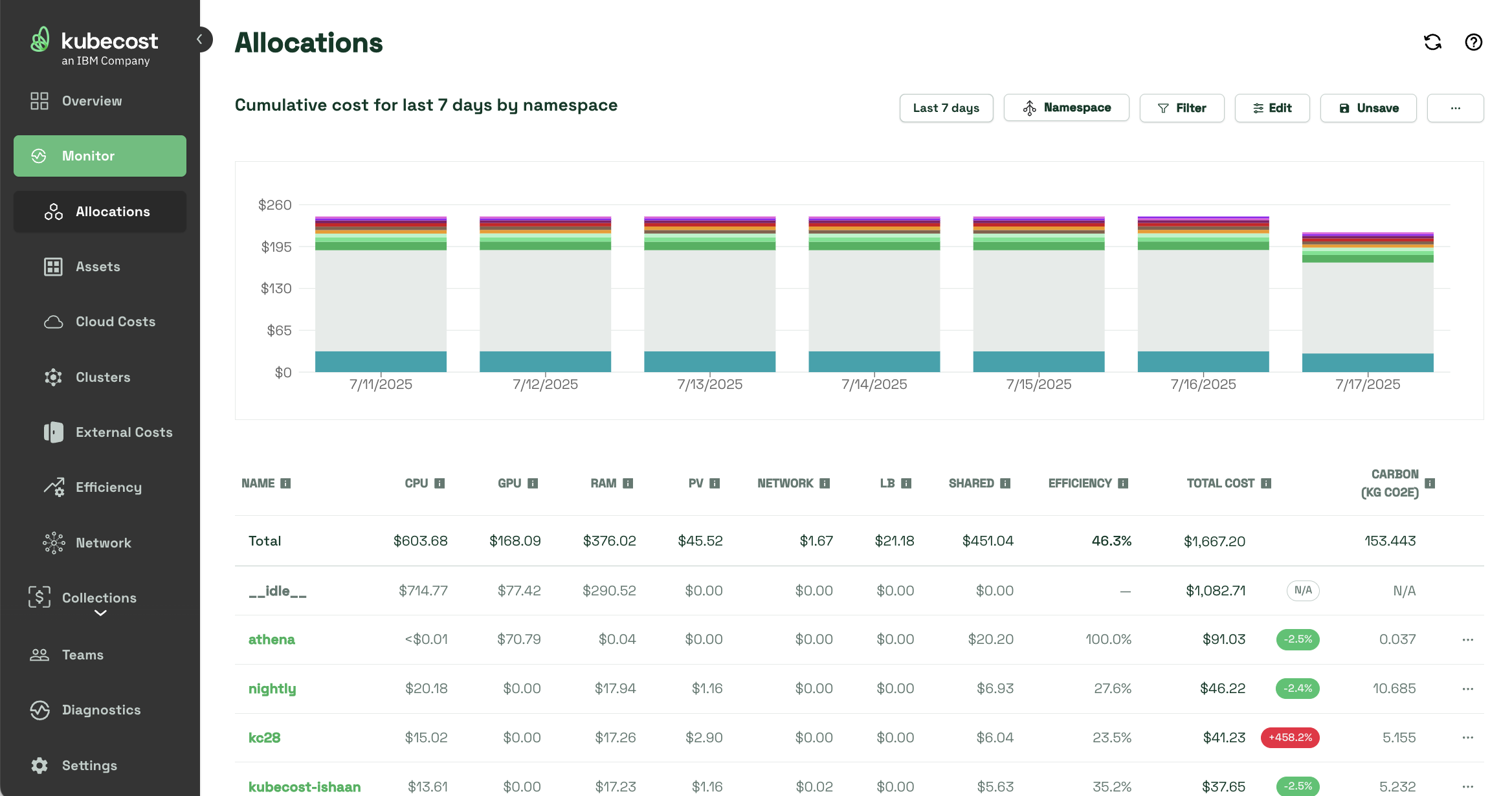
Engineers can drill down into specific workloads, explore shared cost breakdowns, and view right-sizing recommendations. The dashboard also supports visibility into:
- Idle resources: Show or distribute unused capacity across nodes or clusters.
- Efficiency metrics: Track requested vs. actual resource usage.
- Shared resources: Allocate costs for platform-wide services like logging or ingress.
- Historical and forecasted spend: Understand past trends and predict future costs.
Structuring Ownership with Collections
Once spend is visible, the next step is grouping it meaningfully and assigning it to the right teams. Collections make this possible by letting you combine Kubernetes and external cloud resources under a single logical unit: a team, an app, a business unit, or any function that spans infrastructure.
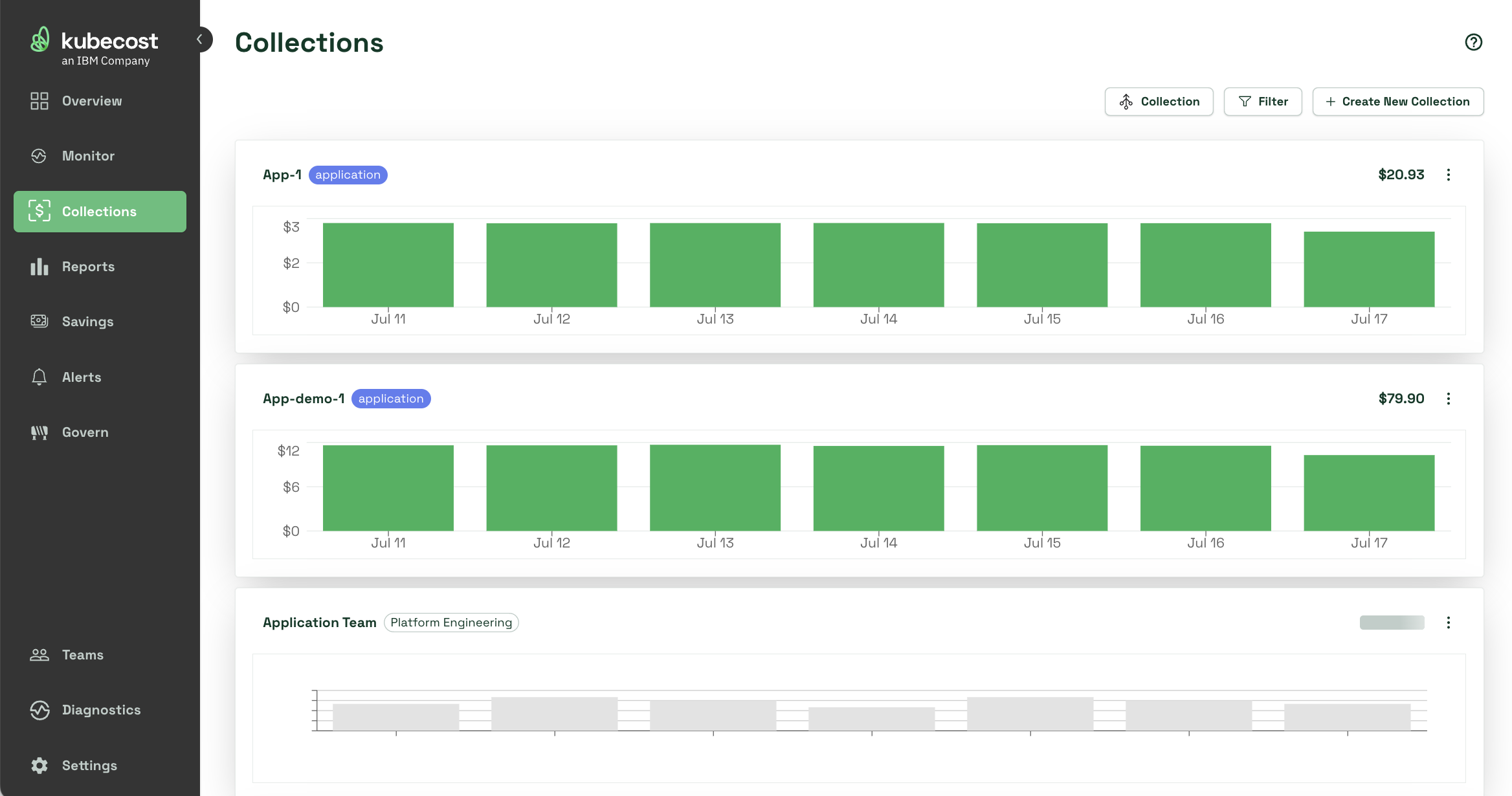
Collections are built using Kubernetes metadata (like labels or namespaces) and cloud provider tags. Kubecost automatically deduplicates overlapping resources across collections, so shared services aren’t double-counted.
Starting in version 2.7, enhancements to Collections support:
- Shared cost allocation across collections (weighted or evenly split).
- Chargeback categories that group collections and assign final costs per owner.
- Improved accuracy for overlapping resources, ensuring collections reflect true usage.
Identifying Spending Gaps with Diagnostics
Even with strong cost models, gaps happen—misconfigured clusters, missing data, or untracked workloads. Diagnostics makes it easy to spot these problems before they show up in reports.
The Diagnostics view shows which clusters are reporting incorrectly, flags errors or telemetry gaps, and simplifies debugging. This helps ensure every team’s costs are visible and accurate.
Enforcing Accountability with Granular RBAC
Ownership doesn’t mean much if the wrong people have access to the wrong data—or if everyone has access to everything. Kubecost provides role-based access control (RBAC) that allows admins to customize the platform experience for each user.
Admins can filter what individual users or groups are allowed to see and do based on their role or scope of responsibility. Engineers can focus on the namespaces and workloads they manage, while finance and leadership teams can view filtered reporting tied to their domains.
This enforces the principles of least privilege, improves security, and eliminates distraction from irrelevant data. For organizations practicing cost ownership at scale, RBAC is essential for governance, compliance, and operational clarity.
Staying Informed with Budgets, Alerts, and Automated Reporting
Kubecost gives teams multiple ways to stay on top of cloud spend—without manual oversight. Budgets, alerts, and automated reporting work together to keep teams informed in real time. Complete clarity without the risk of manual error.
Budget Enforcement
With Budgets, you can define spend limits by namespace, cluster, label, collection, and more. Budgets can reset monthly or weekly and trigger alerts at predefined thresholds (e.g., 80% of budget used).
Custom Alerts
Alerts can notify teams when spend exceeds thresholds, efficiency drops below target, or usage spikes unexpectedly. They can be delivered by email, Slack, or Microsoft Teams, making it easy to integrate into existing channels.
Automated Reporting
For teams integrating Kubecost into broader workflows, APIs and export options make it easy to pull cost data into reports, audits, and planning tools. You can also configure Kubecost to automatically send scheduled CSV or PDF reports to key stakeholders, ensuring teams always have access to the latest cost data.
Collaborative, Clear Spend Management without Sacrificing Speed
Kubernetes cost ownership starts with visibility and ends with accountability. When workloads are dynamic and shared across teams, it’s easy for cloud costs to go untracked. But with consistent labeling, clear ownership boundaries, and the right tools to support governance, teams can take control of their spend without sacrificing speed.
Want to put these ideas into action? Install Kubecost for free to get real-time visibility, define ownership boundaries, and give every team the insights they need to spend smarter.


