
![ApptioCareers-Employee[1]](data:image/svg+xml;base64,PHN2ZyB4bWxucz0iaHR0cDovL3d3dy53My5vcmcvMjAwMC9zdmciIHZpZXdCb3g9IjAgMCAyMjUgMjc1IiB3aWR0aD0iMjI1IiBoZWlnaHQ9IjI3NSIgZGF0YS11PSJodHRwcyUzQSUyRiUyRnd3dy5hcHB0aW8uY29tJTJGd3AtY29udGVudCUyRnVwbG9hZHMlMkZlbGVtZW50b3IlMkZ0aHVtYnMlMkZBcHB0aW9DYXJlZXJzLUVtcGxveWVlMS1xZzVuenB5MHdoaWJtbzZvdmJqNGM3MHh0aTUzdmo1OHM0endwajh0dHMucG5nIiBkYXRhLXc9IjIyNSIgZGF0YS1oPSIyNzUiIGRhdGEtYmlwPSIiPjwvc3ZnPg== "ApptioCareers-Employee[1]")
IBM Kubecost 3.3 is here, with four primary updates: our new MCP server, refreshed Monitor pages, AWS NAT Gateway costs and expanded visibility into additional network costs, and the return of the Namespace Turndown action. The release also includes several smaller updates, such as support for AWS CUR 2.0, additional node labels from external ConfigMaps, a new Efficiency API endpoint, and Allocations filtering by Kubernetes annotations. At its core, this release expands both the depth of insight IBM Kubecost provides and the way teams can act on that information, making cost intelligence more operational and actionable. Continue reading to learn about our primary updates and how to get started.
Data and insights through the new MCP server
Kubernetes cost data can be difficult to investigate, interpret, and explain, especially when users are unfamiliar with Kubernetes terminology, concepts, or where to find the data they need. Executives, FinOps practitioners, engineering managers, and platform engineers all need different levels of detail. Getting the right data and context can require working directly with APIs, building custom queries, and maintaining integration logic over time as new tools or AI clients are introduced.
Kubecost 3.3 introduces a new beta Model Context Protocol (MCP) server, giving MCP-compatible clients a standardized way to access Kubecost’s rich historical insights into Kubernetes cost and usage. Once connected to an MCP-compatible AI application or agent, teams can query Kubecost data using natural language, investigate spending patterns, and dive into what’s happening across their monitored environments. This makes it easier to bring Kubecost intelligence into the AI tools teams already use to explain trends, surface optimization opportunities, and turn analysis into executive-ready reports.
Through the new MCP server, teams can:
- Investigate Kubernetes costs faster: Use natural language to explore spend changes, compare periods, investigate workload utilization, and trace what’s driving cost.
- Turn Kubecost data into useful outputs: Summarize findings, explain trends, and turn analysis into reports for engineering leaders and executives.
- Make historical Kubecost intelligence actionable: Identify abandoned workloads, surface savings insights, and prioritize meaningful optimization opportunities.
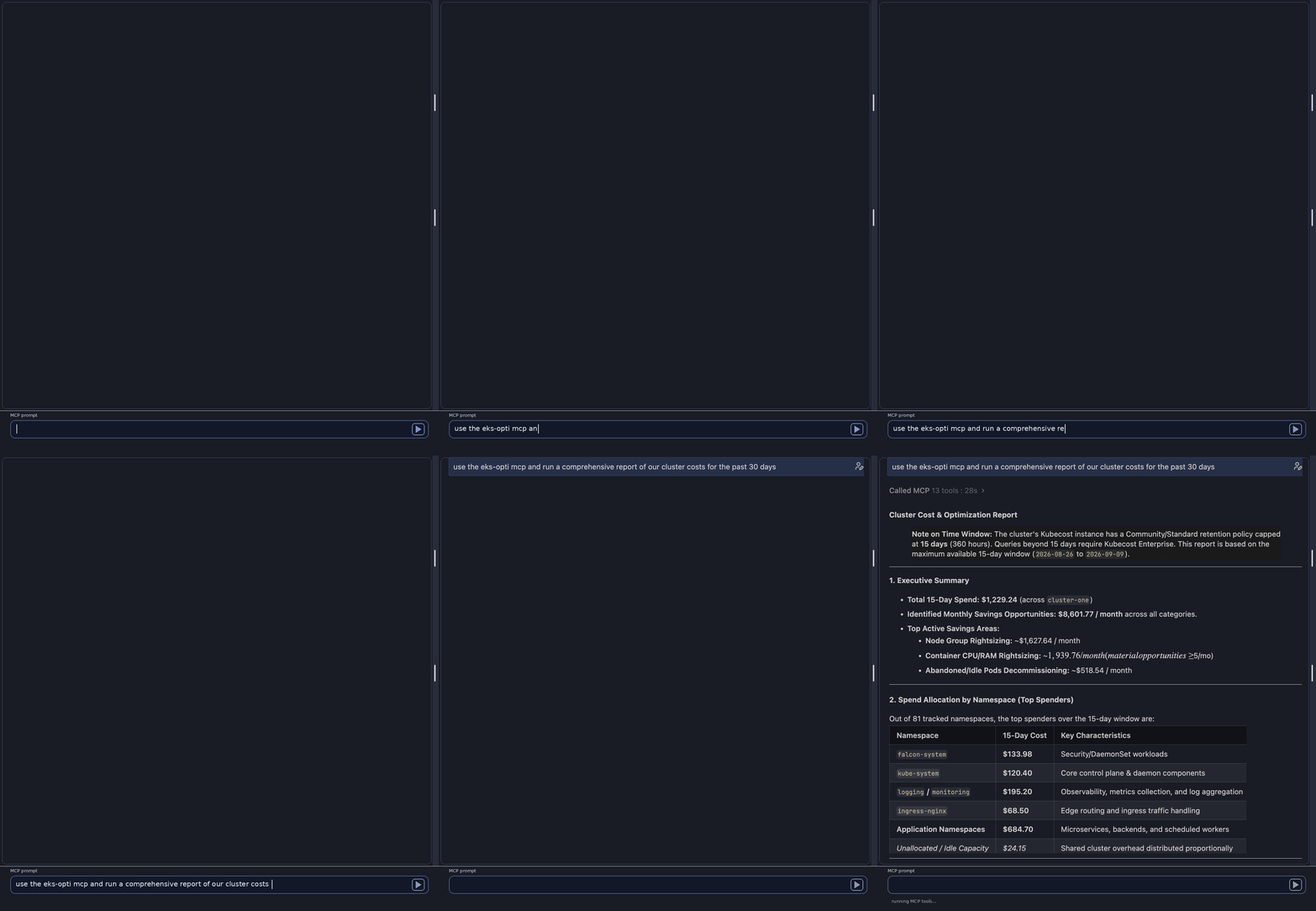
Figure A: The Kubecost MCP server generates a cluster cost and optimization recap.
The beta MCP server is bundled with the Kubecost Helm chart and enabled by default in Kubecost 3.3. It is included with all editions of Kubecost and is also available open source for teams that want to deploy it independently. While the initial release is read-only, it lays the groundwork for richer agent-driven workflows in future releases.
Refreshed user experience across Monitor pages
Kubecost 3.3 also brings a refreshed user experience to the Overview page and several core Monitor pages, including Allocations, Assets, and Cloud Costs. These pages now use the IBM Carbon Design System, creating a more consistent visual experience with other IBM products. The refresh also streamlines several of the workflows teams use to explore, analyze, and report on costs.
Saved reports
Saved reports are now accessible directly within the Allocations, Assets, and Cloud Costs pages. Users can select and adjust an existing saved report or build a new report from scratch, without navigating away from the page they are working from.
Cost configuration
A new cost configuration control brings settings such as idle cost, cost metrics, and shared resources into one place, making it easier to tailor how costs are represented and save those choices as part of a report.
Inspect
The inspect feature has also been refreshed and is now available across all aggregations. Users can drill into individual line items for a more detailed breakdown of the aggregation they are viewing. This feature is also where expanded network cost details are surfaced, covered in the next section.
AWS NAT Gateway, cross-zone, and cross-region costs
Network costs are often one of the hardest parts of a Kubernetes bill to explain. Teams might see network spend increasing, but struggle to determine which resources and traffic patterns are driving it, how traffic is moving across environments, or if charges are coming from cross-zone, cross-region, or other network connections.
Kubecost 3.3 expands network cost visibility, allowing users to drill into a detailed breakdown through the refreshed inspect feature on the Allocations page. Through this view, users can now see network costs broken into categories including AWS NAT Gateway ingress and egress, cross-zone, and cross-region traffic. This helps close the gap between the cloud bill and the Kubernetes resource view. When network spend changes, teams can investigate the Kubernetes resources and traffic patterns contributing to it rather than stopping at a single network total.
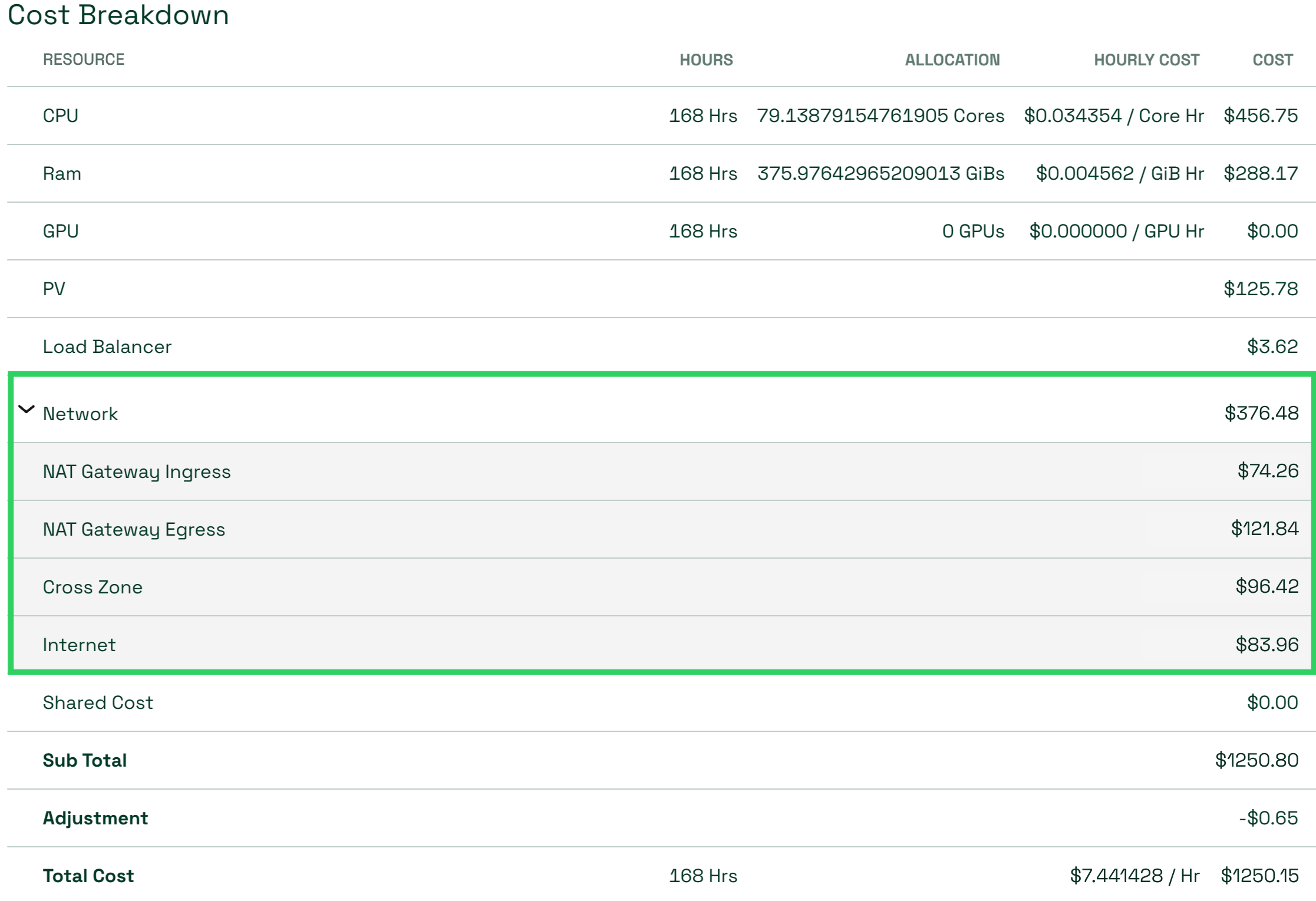
Figure B: The inspect view breaks down $376.48 in network costs into NAT Gateway ingress and egress, cross-zone traffic, and internet traffic, making it easier to see what is driving the total.
Some setup is required for network cost attribution. Kubecost’s network cost daemonset must be deployed. On the AWS side, VPC flow logs must be enabled with the logs written to an S3 bucket, and Kubecost network costs must be configured to read those logs and enable NAT Gateway traffic tracking. Once these components are in place, Kubecost can include AWS NAT Gateway and other network traffic costs in the breakdown.
Automated cleanup with Namespace Turndown
Development, test, and staging environments often include namespaces that only need to exist for a limited period of time. When those environments are no longer needed, however, cleanup often depends on developers remembering what they created and removing it manually. Left running, those workloads continue to consume cluster capacity and generate costs.
Kubecost 3.3 brings back the Namespace Turndown action with more control over how namespaces are targeted and when cleanup occurs. Users define a set of filters to identify targeted namespaces. Before the action is created, Kubecost shows the namespaces that currently match the filters along with their controller count, pod count, and current cost. Users then schedule the action using predefined cadences or a custom schedule for more granular control. A dry-run option lets teams validate which namespaces would be deleted before enabling the action, while the audit log records both dry-run results and completed actions.
This action can be useful for scenarios like:
- Development and test environments: Remove namespaces that only need to run during active development periods.
- Weekend or holiday cleanup: Schedule temporary environments for removal when teams know they will not be in use.
- Demo and sandbox environments: Automatically clean up short-lived namespaces after they are no longer needed.
- Repeatable cleanup across teams or projects: Use namespace labels and other filters to consistently target known classes of ephemeral environments.
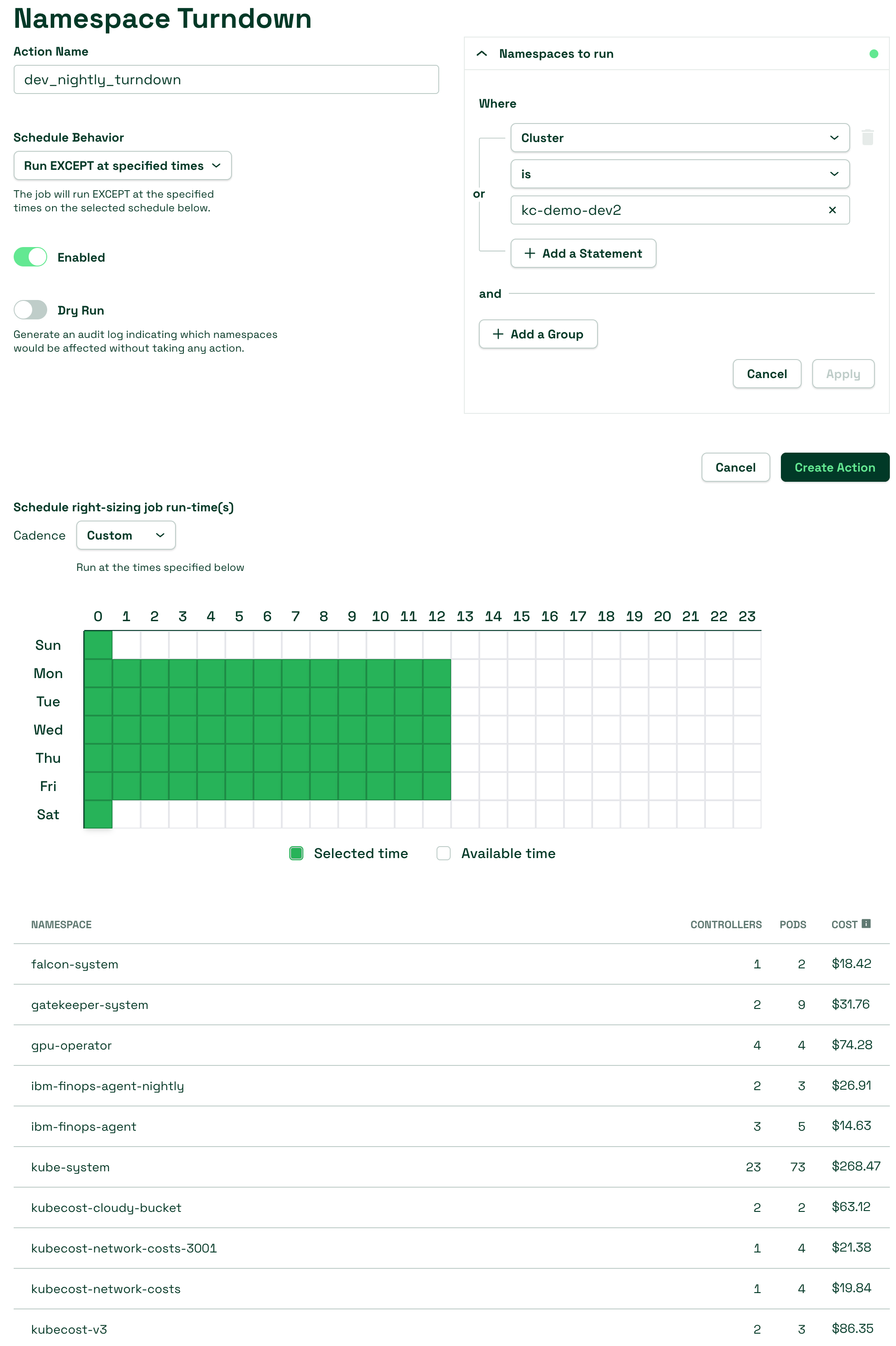
Figure C: A Namespace Turndown action targets namespaces in kc-demo-dev2, shows the namespaces and costs that could be affected, and uses a custom schedule to control when the action can run.
When the action runs, Kubecost first uninstalls any Helm releases in each matching namespace, then deletes the namespace and the workloads within it. Removing those workloads can allow the cluster to scale down nodes, helping teams reduce the cost of unused capacity. To use this action, users must have Actions enabled via Helm, and Enterprise customers must be on a v2 license.
Additional updates in 3.3
The release also includes several additional enhancements:
- AWS CUR 2.0 support: Kubecost now supports AWS Cost and Usage Report 2.0 alongside the legacy CUR format. If a customer moves from the legacy format to CUR 2.0 in AWS, Kubecost can pick up the new format without a Kubecost restart.
- Kubernetes annotations in Allocations: Annotation-based aggregation and filtering, previously available through the API, is now available in the Allocations UI alongside labels. Annotation autocomplete is not yet available, so users must enter the annotation manually.
- Efficiency API endpoint: A new backend API exposes efficiency information that previously had to be assembled through frontend API calls, making it easier to consume from an internal developer platform, provisioning platform, FinOps tool, or another external system.
- Additional node labels from ConfigMaps: Kubecost can read selected key-value metadata from an existing Kubernetes ConfigMap and join those values to node labels inside Kubecost. This gives teams another way to use node metadata when their provisioning process does not allow labels to be written directly to the nodes.
Upgrade note: Kubecost 3.3 is the final release that supports the v1 Enterprise license format. Customers still using a v1 license should contact IBM Support or their customer success team to exchange it for a v2 license before upgrading beyond 3.3.
Get started with IBM Kubecost 3.3
To get started, install or upgrade to IBM Kubecost 3.3 and review the latest documentation for setup and configuration details.


